Quick in-browser SEO checks with privacy-first Subham SEO Chrome extension
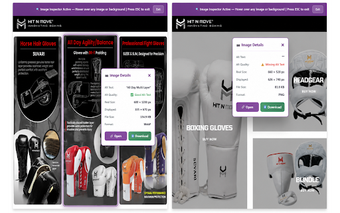
Subham SEO, from developer nbss2929, is a Chrome extension built for immediate on-page inspection and quick technical verification. The extension runs inside the browser and delivers instant audits of titles, meta descriptions, canonical URLs, heading hierarchies, and schema without external server latency. It also offers a hover-based Image Inspector and social tag preview for Open Graph and Twitter Card checks, aimed at SEO specialists, developers, and site owners who need fast, privacy-focused verification during routine audits.
What the extension checks in one click
Designed for spot audits, the tool inspects core on-page elements so you can verify a page without loading external services. It reports on:
- Page titles, meta descriptions, and canonical URLs
- Heading hierarchy from H1 to H6
- Internal and external links plus schema markup
This makes the extension suitable for targeted technical troubleshooting and quick editorial reviews.
How it behaves in the browser and during quick audits
The extension is ultra-lightweight, about 71KiB, and the listing notes it does not slow down browser performance. Because analysis runs locally, audits avoid the latency associated with external server requests, which helps when you need immediate feedback during page edits or content reviews without waiting for remote reports.
How images and social tags are inspected
The interactive Image Inspector provides hover-based checks for dimensions and ALT text, letting you validate visual assets directly on the page rather than through static lists. A social tag preview reveals Open Graph and Twitter Card metadata so social sharing previews can be confirmed before publishing, reducing the back-and-forth when preparing content for distribution.
What the extension does with your data and where it runs
The extension performs 100% local processing with no tracking or analytics, a design choice the developer promotes as privacy-first. It is available for Chrome on desktop platforms, including Windows, macOS, Linux, and ChromeOS, which makes it immediately usable for desktop editorial and development workflows without account sign-in requirements.
Best used as a rapid verification companion, not a site-wide auditor
The extension suits workflows that rely on fast, manual verification during content and development passes; it complements scheduled, site-wide crawls rather than replacing them. For practical use, enable the extension while doing editorial reviews and run a dedicated crawler on a schedule to surface cross-page issues. This combination preserves quick checks while delivering the depth required for technical remediation.